








Use cases
Software Products E-commerce MSPs Schools Development & Marketing DevOps Agencies Help Desk
Company
Internet Status Blog Pricing Log in Get started free

Third-Party Outages. Automatically in Rootly.

IsDown monitors 6320+ vendor status pages and feeds outage data directly into Rootly. Your incident timeline has third-party context from the first minute, not 30 minutes in when someone checks a status page.

14-day free trial No credit card required 2-minute setup

We used to juggle multiple channels to observe the services we depend on. With IsDown, I just pick which services to monitor.

Ishan K., DevOps Engineer

Very happy with IsDown. Setup and management is straightforward, and the support team has been excellent, always quick to answer questions. Definitely recommend.

Laurent D., Lead SRE & Platform
IsDown + Rootly

Third-Party Context for Every Rootly Incident

IsDown fills the vendor blind spot in your incident workflow. 6320+ services monitored, feeding context directly into Rootly.

Automated Workflows

Vendor incidents in your Rootly workflow automatically

When AWS, Stripe, or GitHub has an issue, Rootly creates or updates an incident with full vendor context. Your team's Slack war room has the right information from the start.

  • Automatic Rootly incidents for vendor outages
  • Full context: affected services, severity, regions
  • War room has vendor info from the start
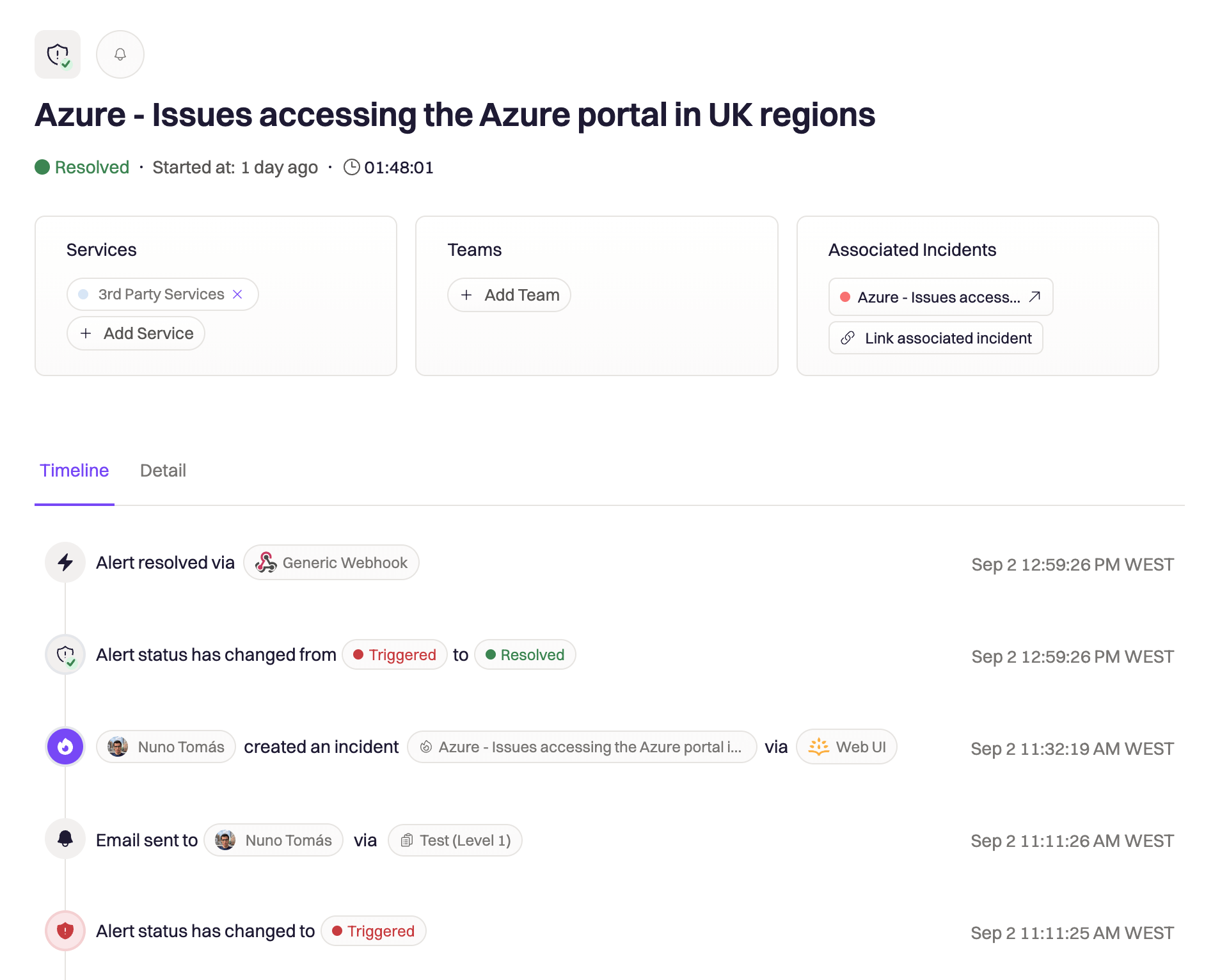
Rootly incident with third-party vendor context from IsDown
Faster Triage

Stop the 30-minute triage tax

Without vendor visibility, your on-call spends 20-30 minutes ruling out their own code before checking status pages. IsDown eliminates this. Vendor context is in Rootly before triage begins.

  • Vendor context available before triage starts
  • Eliminate 20-30 minutes of unnecessary debugging
  • On-call knows it's a vendor issue immediately
IsDown and Rootly integration reducing triage time
Smart Playbooks

Feed your playbooks with vendor context

Rootly's automated playbooks can trigger differently based on whether the incident is vendor-caused. IsDown gives Rootly the signal to run the right playbook automatically.

  • Vendor-specific metadata for playbook routing
  • Different responses for vendor vs. internal issues
  • Automated incident categorization
Auto-Resolve

Auto-resolve on vendor recovery

When a vendor recovers, IsDown updates the Rootly incident automatically. Your timeline closes cleanly without manual updates.

  • Automatic incident resolution on recovery
  • Clean incident timelines, no manual cleanup
  • Full vendor incident history preserved
Simple Setup

How it works with Rootly

Get started in minutes. Three steps to add third-party vendor context to your Rootly incidents.

Step 01

Select the vendors critical to your business

Pick from 6320+ supported status pages. AWS, Stripe, GitHub, Salesforce, and thousands more. Monitor only the services your product depends on.

Step 02

Connect IsDown to your Rootly account

Add your Rootly webhook in IsDown. The setup takes 2 clicks. No coding required, no complex configuration.

Step 03

Vendor outages flow into Rootly automatically

When a vendor has an incident, Rootly gets full context: affected services, severity, regions, and status updates. Incidents auto-resolve when the vendor recovers.

Setup takes 2 minutes. Try it free.

14-day free trial · No credit card required · No code required

Why IsDown + Rootly

Vendor Context From Minute One, Not Minute Thirty

Without IsDown
  • Vendor cause discovered 20-30 min into triage. Your team debugs their own code first.
  • Time wasted on vendor-caused issues. No way to quickly rule out third-party problems.
  • Generic playbooks regardless of cause. Same response whether it's your code or a vendor.
With IsDown + Rootly
  • Vendor status in Rootly from minute one.
  • Immediately identified as a vendor incident. No wasted debugging.
  • Vendor-specific playbooks triggered automatically.
  • Exact vendor timestamps in your incident timeline.
Start Free Trial

14-day free trial · No credit card required

Use Cases

How teams use IsDown + Rootly

Vendor context flows into the incident workflows your team already runs.

Slack-Native Engineering Teams

Vendor context in your Slack war room from the start

Your team manages incidents in Slack via Rootly. When Stripe has a payment issue, IsDown creates a Rootly incident that spins up the Slack war room automatically with vendor context already in the channel.

Teams with Complex Vendor Dependencies

Full operational visibility, internal and external

You depend on 40+ SaaS tools. IsDown monitors all of them and feeds vendor incidents into Rootly. Your on-call has full operational visibility, internal and external, in one place.

SRE Teams

Automate vendor incident triage with playbooks

IsDown creates incidents with vendor-specific metadata. Rootly uses this to trigger the right playbook automatically. Vendor issues get the vendor playbook. Internal issues get the internal one.

Frequently Asked Questions

How is IsDown different from Rootly's existing alert sources?

Rootly's alert sources monitor your own infrastructure. IsDown monitors your vendors' infrastructure: the 6320+ external services your product depends on. Together, you have complete incident coverage, internal and external.

Can IsDown trigger specific Rootly playbooks for vendor incidents?

Yes. IsDown creates incidents with vendor-specific metadata that Rootly can use to trigger different playbooks based on the affected vendor or severity.

How do I connect IsDown to Rootly?

After signing up, go to your IsDown dashboard, then Alerts & Integrations, then Add Rootly. Add your webhook URL and you're done. The entire setup takes less than 2 minutes.

Which services does IsDown monitor?

IsDown monitors 6320+ services including AWS, Azure, GCP, Stripe, GitHub, Salesforce, Datadog, and more. If a service has a public status page, we likely monitor it.

Will IsDown create too many incidents in Rootly?

You control exactly which vendors and severity levels trigger Rootly incidents. Most teams monitor 10-30 critical vendors and route only high-severity issues to Rootly. Low-severity degradations can go to Slack instead.

How quickly are incidents created in Rootly?

IsDown detects outages independently, often before vendors update their own status pages. Rootly incidents are created within seconds of detection. Your team has context before the vendor even acknowledges the issue.

Never again lose time looking in the wrong place

Add third-party vendor outage context to your Rootly incident workflow. Setup takes 2 minutes.

14-day free trial · No credit card required · No code required